Showing posts with label 'Julie Wise". Show all posts

Monday, March 28, 2016

Story of Us: Courage, Collaboration, and Connection

We cannot live only for ourselves. A thousand fibers connect us with our fellow men; and among those fibers, as sympathetic threads, our actions run as causes, and they come back to us as effects. – Herman Melville

 
WEEK TEN: Share the STORY OF US as we explored our identities through multimodal content (i.e., images, video, audio, and text). Throughout the 2016 #WalkMyWorld Project we weaved a thousand different fibers that now connect us as digital learners. Individually you shared your daily walk so others could "walk in your world." In this final learning event, examine the STORY OF US by asking: What did you learn about yourself as a multimodal meaning maker? What new insights do you have about your digital identity as a #WalkMyWorld collaborator? What connections will you take with you into your future?

PAST: The STORY OF US began with courage. Many of us were creating a public Twitter account for the first time (see screenshots of my Twitter conversation below). The #WalkMyWorld Project provided a safe and supportive space to consider personal and socially constructed digital identities. While some participants embraced the thrill of sharing their daily walk, others were afraid to blend their personal and professional identities. Together #WalkMyWorld discovered it takes courage to create and share multimodal content in public spaces.
 

PRESENT: The STORY OF US sparked collaboration. Each learning event provided opportunities for educators and students to collaborate through new mediums and digital tools. Those with experience in creating digital content served as mentors, providing examples and answering questions. Novice multimodal makers began to recognize the power of communicating through remixing images, text, video, and audio content. Even though I have experience creating multimodal content, I am a novice when it comes to researching multimodal meaning making. One of my favorite researchers, Dr. Donna Alvermann, served as a mentor for my work when she responded to my post about student-created documentaries (see screenshot below). Together #WalkMyWorld collaborated as a community and inquired about the various processes of multimodal meaning making.

FUTURE: The STORY OF US inspired connections. As educators engaged their students in hybrid learning spaces, it was important to explore the blurred lines between face-to-face and online interactions. This year #WalkMyWorld connected with #HearMyHome to learn more about how soundscapes (i.e., daily sounds and rhythms) define cultures and communities. This connection introduced us to new digital tools like Soundcloud and Radio Aporee. #HearMyHome also helped us gain a deeper understanding about the power of creating audio content (See screenshot of our conversation below). Together #WalkMyWorld has transformed our daily walks from individual explorations into a connected community that now walks together on this nomadic multimodal journey.

Invitation: REFLECT on your engagement with the 2016 #WalkMyWorld Project. This could include your courage, collaborations, or connections you made throughout the ten learning events. DESCRIBE how your daily walk shaped the STORY OF US. SHARE your creation on Twitter using the hashtag #WalkMyWorld #LE10. It’s time. What will you share? Explore.Play.Create.Learn.

Interested in learning more about #WalkMyWorld, visit: walkmy.world


Monday, February 29, 2016

Soundscapes: Mundane Sounds and Daily Rhythms

The present moment is filled with joy and happiness. If you are attentive, you will see it. – Thich Nhat Hanh


Natural Landscapes converted into Sound Waves by Anna Marinenko

WEEK SIX: Capture the sounds from your world that help you recognize the miracle in mundane sounds. Landscapes are the visual features of an area. Soundscapes are the audio features of an area. This week, #WalkMyWorld is teaming up with our friends in the #HearMyHome project to consider the "mundane" sounds that create your daily rhythms. Do you hear what I hear? Listen. Look around. Listen again. What soundscapes surround you? Click on the orange circle below to hear the soundscape from my morning.

   
If you want to engage students in exploring soundscapes, check out Radio Aporee. Radio Aporee is an amazing free digital tool that allows you to travel to distant lands to listen to the mundane sounds and daily rhythms. On the lower right hand corner you will see a plus and minus sign that allows you to zoom in and out around the globe. Click on a red dot to hear the sounds and read information on where and when the sound was uploaded. 
Invitation: Confine your field of focus to only what exists within a ten-foot circle around you. ASK yourself: How do persistent sounds in my work space such as: the ticking of a clock, the tapping of keys, or the slamming of locker doors, fill the spaces of my day? CHOOSE subtle sounds that create mundane rhythms and music. CAPTURE these soundscapes using Soundcloud as a means to record and share out this audio content. SHARE your creation on Twitter using the hashtag #WalkMyWorld, #LE6, and #HearMyHome. It’s time. What will you share? Explore.Play.Create.Learn.
 
Interested in learning more about #WalkMyWorld, visit: walkmy.world

Friday, February 26, 2016

Be Mindful of Voices during a Turning Point: #WalkMyWorld #LE5

Real courage is when you know you’re licked before you begin, but you begin anyway and see it through no matter what. – Harper Lee


WEEK FIVE: Explore how the human voices in your world guided you during a turning point in YOUR Story. This week, #WalkMyWorld invites you to identify a turning point or roadblock in your story and how sounds of human voices helped you overcome that challenge?

The human voice is a powerful tool that can be used to entertain, empower, and encourage people of all ages. Yet, many educators neglect to teach students how to be mindful of their oral voice (i.e., the spoken word) and their inner voice (i.e., the thinking word). The meaning of a word can be conveyed differently by making adjustments to the human voice through four affordances:
  • Pitch - high/low
  • Tempo - fast/slow
  • Tone - sharp/soft
  • Inflection - animated/monotone   
TEDEd Lessons Worth Sharing: One of the best tools I have used to increase students' awareness of the power of their voice is through TEDEd Lessons Worth Sharing site. Each lesson provides four different components that empower students' voice through listening and speaking. First, students can WATCH Steven Claunch tell the story of how he overcomes obstacles. Then, students THINK (inner voice) about the message of the story through 5 multiple choice and 2 short answer questions. Next, students can EXPLORE resources to compare what other people are saying about the topic. Finally, students can SHARE their own voice through an online discussion forum. There is also an option for educators to customize the lesson.

Sound Cloud: I am starting to play around with www.SoundCloud.com, a free website and app that allows you to record, collaborate, and share sounds. LISTEN to my voice as I describe how Walker Clark, a brilliant life coach, guided me during a turning point in my life:
 
Invitation: THINK of a turning point when you had to overcome an obstacle. RECORD your voice using Sound Cloud and tell the storySHARE your creation on Twitter using the hashtag #WalkMyWorld #LE5. It’s time. What will you share? Explore.Play.Create.Learn.
Interested in learning more about #WalkMyWorld, visit: walkmy.world

Friday, February 19, 2016

Shape of MY Story: #WalkMyWorld #LE4

The future isn’t a place that we’re going to, it’s a place that you get to create. - Nancy Duarte

WEEK FOUR: Explore your voice and the sounds of your world by diagramming the events that make up YOUR story.  Last week #WalkMyWorld discussed the shape of a story. First, I diagrammed the Three Act Story Arch of a National History Day Documentary. Then, I found a wonderful TEDX talk by Nancy Duarte that discussed a different shape of a story.  Finally, I found an interesting article about a different shape of a video game narrative

This week, #WalkMyWorld invites you to answer these questions: What challenges exist when the story is about you? Use your voice and the sounds of your life to illustrate where you are in your life journey. How do you use language to define who you are and your place in your community/culture?

To begin, I LISTENED to the song from the Disney film, Mulan. Despite the tranquil sounds of nature, she wonders why her reflection doesn't show her authentic self. 


Next, I READ the lyrics to the song so I could get a deeper understanding of her challenges and shape of her story. This song evokes a strong connection to the sounds and shape of MY story which I diagrammed at the beginning of this blog. I realized the shape of my story looks just like the ripples Mulan sees in her reflection. These ripples distort and cloud the authentic reflection of me. Many times I stop and ask myself, "Who am I inside when my reflection shows a mother, a wife, a teacher, a student, a friend, a sister, and a daughter?" At the same time, the shape of my story looks like a speaker, pounding out an orchestra of sounds so loud that I can't think! I hear: cheers of the crowd at my daughters' events, clinking dishes and snoring, the tap, tap, tapping of students typing on keyboards, and the bling of emails and texts calling for my attention. Then, I walk into yoga, where it's warm and quite. I take a deep breath in. I take a deep breath out. Slowly, just as Mulan wipes away her make-up, the sounds that shape my story fade away, til I hear nothing but my heart beat, beat, beating and I am left with nothing but the shape of me. 

Invitation: THINK of sounds that surround you in the morning, noon, and night. CREATE a diagram showing how the sounds shape your story. ANNOTATE your diagram to identify key sounds in the narrative.  SHARE your creation on Twitter using the hashtag #WalkMyWorld #LE4. It’s time. What will you share? Explore.Play.Create.Learn.
Interested in learning more about #WalkMyWorld, visit: walkmy.world


Tuesday, February 9, 2016

Shape of a Story: #WalkMyWorld #LE3

When we own the story, we can write a brave new ending. - Brene Brown
WEEK THREE: Exploring the story of you by considering the shape of a story. Stories come in multiple modes: orally passed down from generation to generation, images capturing a specific time and place, documents representing written thoughts, and video clips revealing the sounds and motion of real people and events. The third learning event of #WalkMyWorld invites you to explore the multiple modes that shape the stories you tell the world.
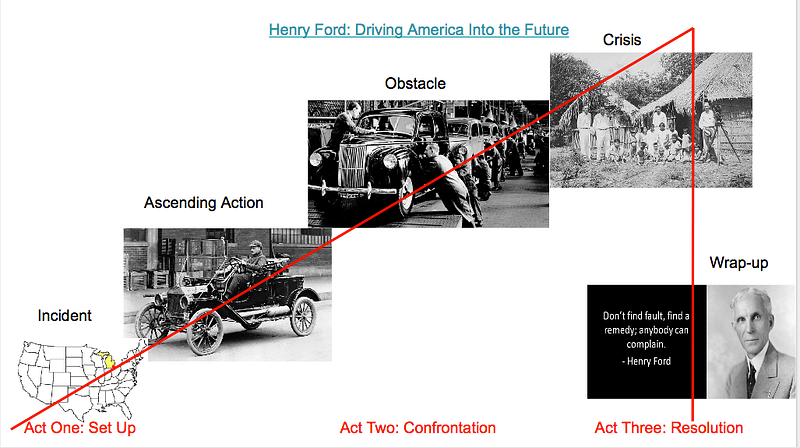
One way I integrate technology while meeting the academic demands of English Language Arts and social studies is through student-created documentaries. These short, two-to-seven minute films, combine multiple media sources with a voice-over narration to demonstrate an understanding of a subject-matter topic or personal event. Since quality documentaries use the THREE ACT STORY ARC (see image above), I decided to diagram the shape of an award winning story from the National History Day Competition.

This is a diagram of a student-created documentary about Henry Ford: Driving America Into the Future.

Notice how the obstacles Henry Ford encountered built the narrative and the multiple modes shaped the story. Next, WATCH the documentary and notice how the narrative is shaped by the author’s ability to weave multiple modes ( e.g., audio, visual, text, and transition effects) into a compelling story. Finally, READ the transcript of the documentary. Research suggests the use of video-editing software scaffolds an intentional revision process as students determine which media source(s) enhance their voice and shape a stronger narrative (Chisholm & Trent, 2013; Parker, 2013; Vasudevan et al., 2010). Do you agree? If your students are turning in boring reports, consider using student-created documentaries as an instructional approach to creating compelling narratives and shaping three act stories.

Invitation: THINK of a story you know well. This could be a cultural folk tale, a song, a TV show or the STORY OF YOU. CREATE a diagram showing the shape of that story. ANNOTATE your diagram to identify plot points at key events in the narrative. You can create this diagram in Google Slides…or simply sketch it out on paper and take a digital photo. DESCRIBE how your diagram and the modes (text, image, audio, video) used in the story affect the shape of the story. SHARE your creation on Twitter using the hashtag #WalkMyWorld #LE3. It’s time. What will you share? Explore.Play.Create.Learn.

Interested in learning more about #WalkMyWorld, visit: walkmy.world

Monday, March 26, 2012

3 Instructional Models for Using the Internet in UR Classroom

Dr. Donald Leu has written numerous articles and books about new literacies in the classroom. This blog focuses on three different instructional models an educator should use throughout the school year. Each model provides a different Internet experience and provides a continuum of teacher control from most controlled (Internet Workshop) to least controlled (Internet Inquiry).

If you are an auditory or visual learner, click this link to watch a collection of short videos in which Dr. Leu explains each model in detail.

1. Internet Workshop - consists of an independent reading of information on the Internet around a topic and a location initially designated by the teacher; it concludes with a short workshop session where students can share and exchange the ideas and strategies they discovered during their work on the Internet. (reading, navigation, critical literacy)For more information, check out this article.

2. Internet Project - engages students in classrooms at different locations in collaborative work to solve a common problem or explore a common topic. (collaborative skills)There are two different types of projects:
a. Web-site projects which are permanent, ongoing projects for world wide use
b. Temporary projects - created by the teacher for classroom use
For more information reading this article.

3. Internet Inquiry – recursive instructional model in which students use the Internet to gather, evaluate, synthesis and communicate information to others (problem identification and research skills)The Big6 model is for students in grades 3 - 12 and Super3 is for students in grades K - 2. For more information, click on this article about Big6 or watch a power point on Super3


Internet Project - Procon.org Example

Internet Workshop is an instructional model that consists of an independent reading of information on the Internet around a topic and a location initially designated by the teacher; it concludes with a short workshop session where students can share and exchange the ideas and strategies they discovered during their work on the Internet.

Here is an example of an internet workshop I conducted on the research question: Are Cell Phones Safe?

1. I searched youtube.com to find a video to begin building background knowledge about the process the United States government uses when deciding on laws and regulations for the country.

2. Next I offered several articles for students to read so they could gather information and make informed decisions on this topic. I use an Inquiry Chart to help organize student's notes.

This first link is directly related to the video: http://cellphones.procon.org/view.resource.php?resourceID=003767
Kelly Gallagher offers wonderful short articles:http://www.kellygallagher.org/resources/AoW%209%20Cell%20Phone%20Etiquette.pdf
A final article links to several opinions on this topic:http://cellphones.procon.org/#did_you_know

3. Finally, students are directed to Procon.org to leave a comment about their opinion: http://cellphones.procon.org/view.answers.php?questionID=001468&tab=reader-comments and then to choose an opposing view point and leave a comment

When teaching students how to learn from the Internet, the Internet Project model can offer structure and teacher control. For more information on Internet Projects, check out: http://www.readingonline.org/electronic/elec_index.asp?HREF=/electronic/RT/3-01_Column/index.html

Monday, March 12, 2012

Music Can Inspire Interest

Many educators use an alligator to understand the abstract symbol used in math to represent "greater or less than". However, the more sensory pathways you can engage, the easier the brain has to create a new neuro-pathway.

In this tutorial, Kristin Daddario, a first grade teacher at Lincoln Edison Charter School, uses the visual pathway (video and pictures) and auditory pathway(music) to reinforce the concept. Check out the video

The next time you have a boring, abstract concept, use music to inspire interest.

Friday, March 2, 2012

4 Context Clues to Clarify Vocabulary

Psst! Hey! Yeah, you! It’s your brain again. I have a secret tool that will save you a lot of time and stress. It's call Local GPS.

Best of all, this Local GPS tool will prevent you from getting confused while reading. I call these confusing words and ideas,
road blocks, because they block the meaning from entering your working memory. Road blocks are those unknown words and phrases that cause you to stop reading and say, “Oh man, what the heck is the author talking about?” Here is a list of road blocks you need to watch out for as you read:

Revisit a vocabulary word when:
• you can’t pronounce the word
• the word is new or unknown
• you are unsure of author’s meaning

Revisit an idea when:
• you are confused.
• you notice you are thinking about other things.
• you can’t create mental images.
• you can’t make a connection.

Skipping over these road blocks isn’t helpful or a mature decision. We are no longer going to let these road blocks stop our thinking! With the help of my built in Local GPS tool we will be able to navigate these road blocks and find a direct, fast, efficient route to the meaning of these unknown words and phrases.


Local GPS is an acronym for the four different types of context clues the author uses to support a reader’s comprehension. To find the local context clues, zoom in to the sentences surrounding the difficult word. Reread the sentence before, and after the word you are trying to understand. The author often uses commas, parentheses, and hyphens to signal definitions, pronunciations, and examples to help the reader build meaning. This is your local context clue because the author’s clues are located right by the word.

The G stands for global. To find the global context clues, zoom out and look at the whole page. Scan the text features (pictures, captions, charts, and maps) to see if they can give you more information. This is called global context clues because you are taking a wide view of the text.

The P stands for prior knowledge. Sometimes the meaning is implied, which means the author doesn’t come right out and say what he means. In this case, you have to look at the text and add meaning to what the author didn’t include. Your schema will help you determine a meaning or clearer picture of the word. Prior knowledge is the third type of context clue because you can use what you already know about this word to build meaning.

The S is the final context clue. Structural analysis is looking at how the word is built. By breaking the word into smaller parts you will be able to decode the meaning. Search for prefixes, suffixes, or root words. Keep in mind working with words is a complex process. Being able to pronounce the word doesn’t mean you know the meaning. Until you know both, the pronunciation and meaning, you haven’t fixed the road block.

Remember, context clues are located within the sentence, on the page, or within your own mind. If you get lost, turn on my Local GPS to help you navigate through the road blocks, gain a deeper understanding of an abstract concept and save time from looking words up on the computer.

Reality Check

You are in the driver’s seat now. Knowing your destination or purpose to read isn’t good enough. You need to know different ways to build meaning by using the context clues on the page to help you figure out unknown words and ideas.

You are now ready to expand your understanding of how your mind builds meaning. The good news is you are independent and free to drive your mind wherever you want it to go. The bad news is your choices may lead you off the road and into a ditch. You must steer yourself over difficult words and through abstract ideas.

Your world is going so fast. Be a rebel and slow down! Once you identify a confusing word or idea, use your Local GPS to guide you to a deeper conversation and understanding of the author’s message. Beware, the more you apply these strategies, the more information you will retain andthe smarter you will become. Avoid the temptation to skip over the words/ideas due to time constraints or lack of effort. This slip of poor judgment will only result in a loss of meaning and a missed opportunity to sharpen your mind’s ability to maneuver around difficult sections of text.

I would love to hear how the Local GPS tool worked for you. Share your thoughts below or join the conversation on facebook.com/myreadingsecrets.

Monday, February 13, 2012

Falling in Love with Edmodo- 6 Steps to Get Started

This is a guest blog from Joanna Wallas, a middle school world language teacher at South Eastern York School District. We would love to hear about your newest technology discoveries and how you apply them to your classroom.

I’m obsessed. I admit it; I am completely and unequivocally obsessed and possibly in love. The object of my affection? Edmodo. You may scoff, as many of my colleagues have, however it does not negate the truth- I a former skeptic, have fallen in love with Edmodo.


Why am I so crazed you may ask? I have discovered that it is not just a mere
facebook interface for the classroom, but a class management system that can
make your classroom mobile. It’s secure, and circumvents several problems that other learning platforms have with email requirements, moderation, peer to peer texting, and parent transparency. Here are some tips to get started with Edmodo, try them and maybe you will fall in love too.

1. Build & Organize your library- The first flirtatious feature that drew my eye was the library. Within minutes, I could upload the entire year of class notes onto Edmodo. However, that was only the beginning. Prezi’s, voicethreads, youtube videos, screencasts, pdfs, audio files, and other websites can be uploaded easily and appear as a small preview icon. The key here is to have a collection of materials from a variety of sources. Many of us already have engaging electronic materials; we just never had an easy secure way to share them with students or maybe even not enough time. After you upload material, you can organize it by folders and control whom you share those folders.Material can appear in more than one folder allowing you to refer to it later on in another lesson, or to allow students to review past concepts.
2. Simplify scanning- The part of my relationship with Edmodo that I dreaded committing to was scanning my paper materials. The thought of sitting there and scanning page after page was daunting. Maybe you have already gone paperless, maybe you haven’t. This was the big thing holding me back; however, I discovered one tiny secret that made my life easier. The brand new photo copier at work emailed scans of images straight to my work email. All I had to do was punch in my address. Most of the teachers in my building are unaware of this, check out your photocopier- you may get lucky. If you are not the lucky goose I am, check out other options like your local library, staples, or mail centers. If you can streamline this part, the rest of the relationship will be easy. Electronic copies can easily be added to posts, assignments, quizzes, and the library.
3. Think ahead and give yourself time- I’m looking forward to marriage or at least a committed relationship with Edmodo. However, I am not diving in and shopping for a wedding ring at this very moment. I’m “dating” first and laying the groundwork for future plans. I work on the library,then make a quiz or two, and then try adding a student or two before adding a whole class with assignments and tasks.
4. Test the Waters-Some couples buy a pet together to see how things work out. I created a fake student to how things would work. I put my fake student into class and explored as her. I gave her assignments, checked out my library (her backpack), and posted things to see how students might experience Edmodo. I learned students can message me or the whole class and I can even moderate those comments. They can’t directly communicate with each other which cuts down on many cyberbullying or time wasting concerns.
5. Join a community- Dating’s more fun when you can do it in a group or with other couples. Many teachers are out there having the same problems you are, or they are creating incredibly innovative things and sharing them with others. This is a great way to multi-task and have a PLN as well as a platform for your students.


6.Meet the Parents and Do Your Homework- This goes back to planning your
dates and your future. You can’t just marry someone your parents never met. Edmodo has a help section with FAQ’s and a blog. They even created some resources that you can adapt to your classroom. These helpful items include student guidelines, codes of conduct, parent letters, and guidebooks for everyone involved. Their resources help explain to parents what Edmodo is and will help you explain what purpose it will serve in your classroom.

As with all things electronic, there are many things like access and time constraints to consider before entering into a relationship with Edmodo. I haven’t yet regretted my commitment. If you decide to start flirting with the idea of Edmodo in your classroom, write and tell me how your relationship with Edmodo works out!

3 Simple Ways to Incorporate Technology into your Classroom


This is a guest blog from Megan Anderson, a Kindergarten teacher at Red Lion Area School District. We would love to hear about your newest technology discoveries and how you apply them to your classroom.

If you’re like me, you love technology and anything related to it. But when it comes to applying it in your classroom… You have no idea where to start! Yep, that was me about 4 weeks ago. I had all these great resources at my fingertips and just didn’t know it. It was overwhelming! If you’re looking for three quick and easy resources to use in your classroom, try youtube, twitter and blogs. Let’s take a look at each.

1.Youtube Youtube can be used for so much more than looking at the latest viral video or checking out cool Superbowl commercials that you missed! There are many educational videos out there and also how-to’s. I searched all over the internet looking for a Groundhog Day video and found everything I needed on Youtube. You can tell a child how the groundhog will come out of its hole and might see his shadow or might not. Until they see it for themselves, it won’t make as much sense. This is where Youtube comes in handy! You can show your kiddos what you are talking about and give it real meaning allowing them to make those important connections.

2.Twitter It seems most every young person you meet has a facebook or twitter account. Let’s take what they already use and turn it into something educational. In the past teachers would assign a reading passage and have students write a summary (using paper and pencils!). Instead of writing the answers on paper, you can have your students tweet (that’s the twitter word for writing a message) a response back to you! Let’s face it, they always have their phones attached to their hip and we know most of these phones have Internet capabilities. The neat thing about it, you need to be concise and synthesize information because you only have 140 characters to form your answer. There is some higher-level thinking!

3.Blogs My eyes were opened to blogs last year. I had a student teacher that kept talking about blogs. Finally I said to her, “What are you talking about? What is a blog?” A blog is basically an online journal that is available on the web. It can be updated daily, weekly, monthly, or whenever it suites the “blogger” (the owner of the blog). As an educator, I am always looking for new and creative ideas. There are so many wonderful blogs that are specific to grade levels and content areas. You can find everything you need from math, to science to social skills! And, instead of recreating the wheel, there are many materials created by other teachers for your use. Give it a try. Click here to go to Google’s blog search. It only searches blogs! Happy searching!

See, that wasn’t too bad was it! Now, where’s that easy button?